For another Juke That to be able to load music from your library, you have to offer a share first. You can do this in the menu item "Offer Music".
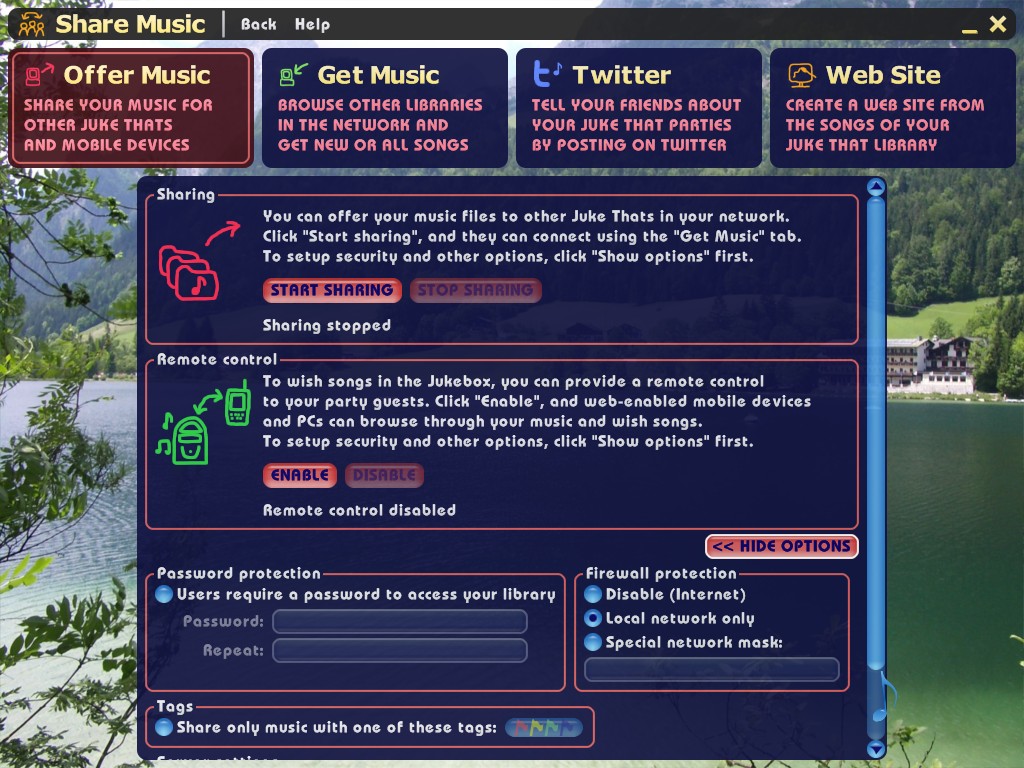
Simple sharing
If you do not like to set up much, just press "Start sharing". Your music can be read from the same network then (this typically excludes the Internet), by another Juke That installation. Don't worry, nobody can write to your library, that's not possible with Juke That in any way.
To end the sharing, press "Stop sharing". All running downloads are cancelled and nobody is able to browse your library anymore.
Advanced sharing, using options
If you like to set up the sharing in more detail, you can configure the following:
- Password protection:
- In order to access your library (browse or downloads), you require a password.
- Firewall protection:
- This option restricts the access to your subnet (this usually is the computers at your home, but not the Internet), or you can also limit access to one or a few computers. Alternatively, you can turn off the firewall altogether. Please note the this is the Juke That firewall only. Your computer and your router may have further firewalls that restrict access.
- Tags:
- If you have marked your songs with colored tags, you can set that other Juke Thats see and download songs of one or more colors only.
- Server settings:
- This customizes the name of your Juke That, and what port to use for sharing. Most of the times, this is not necessary, except you have multiple instances of Juke That running on one computer. Please do not mix up your computer name with the Juke That name. If you enter the name to connect to directly, you still use the computer name there.