This is the section you use at parties or if you like to listen to music. Everything focuses on the wishes of your party guests and the Automatic DJ, that uses the genres to shuffle music. The music never stops, even if the guests stop to wish songs.
Playing Karaoke songs is another feature of the Jukebox.
Controls
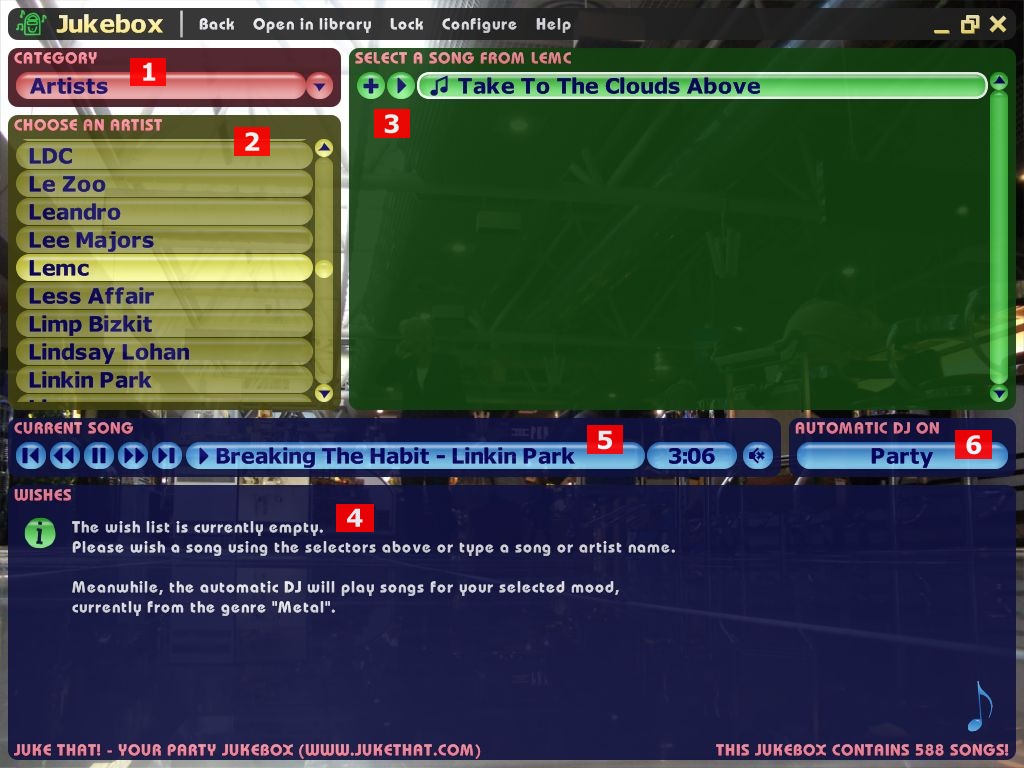
To wish a song, the guests first presses on 1. They then select how they want to choose the song:
- Songs:
- In the yellow group list 2, the guests chooses to see all songs, new songs, popular ones, songs high-rated by the host, etc. "Songs" is ideal to just browse the library, or if no particular categorization fits. After selecting a group, the green songs area shows 3 their songs.
- Aritsts:
- The group list shows all artists, i.e. bands etc. If the guest chooses an artist, the songs lists shows its songs.
- Genres:
- The group list shows all genres. If the guest chooses a genre, the songs lists shows its songs.
- Albums:
- The group list shows all albums. If the guest chooses an album, the songs lists shows its songs.
- Search:
- Starts a search for an artist or song. But you can also just start typing at any time, to start a search.
In the songs list, the guest may now click on the plus sign to wish a song. It then shows up in the wish list 4. You can remove wishes by pressing the minus sign next to the song. Using the play sign, you can instantly play a song, but this cancels the currently playing one. If you do not like your guests to do this, turn this feature off in the Configuration.
In the center of the screen, you can see the player 5, which always shows the currently playing song. You can skip or pause a song here, and change the volume etc.
One of the most important elements of the Jukebox is the Automatic DJ 6. You can set it up by pressing this button. You find more about the Automatic DJ here.